
1. Review before switching on the engine
Replay your game with analysis hidden. Stop where you felt uncertain, spent a long time, or were surprised by your opponent’s reply. Pick two or three of those positions instead of trying to explain every move in one sitting.
For each position, write down what you were trying to achieve. Were you developing a piece, defending a threat, or preparing an attack? Add the reply you expected. This preserves your original reasoning so you can compare it with what actually happened.
2. Write down candidate moves
Before checking a suggestion, find two or three legal moves yourself. Look for checks, captures, and immediate threats, then consider moves that improve a piece or protect a weakness. Give each candidate a short explanation.
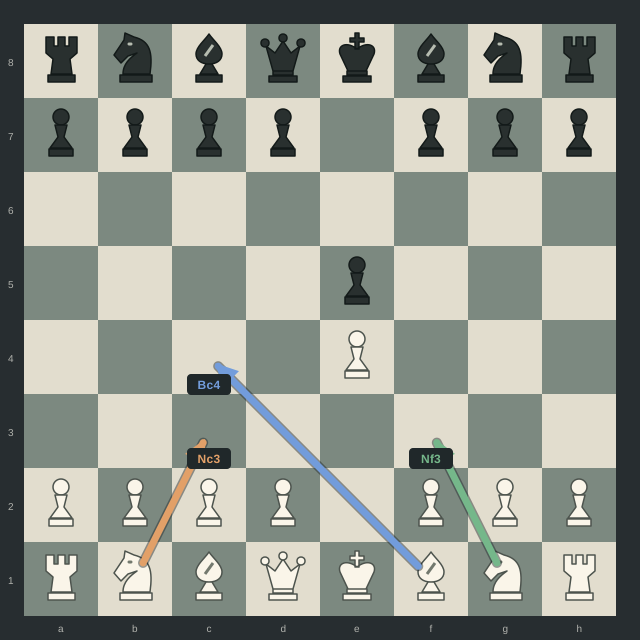
After 1. e4 e5, for example, 2. Nf3 develops a knight and attacks the e5 pawn. 2. Bc4 develops the bishop toward f7. 2. Nc3 develops the other knight and defends e4. These are different ideas to investigate, not a claim that one is always the best choice.
3. Compare Maia and Stockfish
Maia is trained to predict human moves at different skill levels. A likely human move can still contain a mistake. Treat its suggestions as candidates to examine, rather than proof that a move is sound.
Stockfish analyzes positions to find strong moves. Use its evaluation and continuation to check the consequences of your candidates. The distinction matters: a move’s likelihood among human players and its strength are different things.
EasyChess combines these roles by generating Maia candidates and evaluating them with Stockfish. Its color ranking compares the displayed candidates; it does not establish that the strongest move in the entire position must be among those candidates.
4. Find the reply you missed
When the engine dislikes your move, play through its suggested reply on an analysis board. Stop as soon as you can name a concrete consequence: a piece is lost, a threat cannot be met, or an intended plan no longer works. Then return to the original position and check an alternative.
Keep the comparison consistent. Check which side the evaluation favors and allow the analysis to settle before comparing moves. If the ranking changes as the search continues, investigate the new continuation rather than treating the first number as a verdict.
5. Turn the position into practice
Write one specific lesson, such as “I moved the defender before checking the capture on e4.” Save the position with the answer hidden and revisit it later. Try to identify the threat and calculate the reply before revealing your notes.
For your next review, look for the same pattern in another game. A useful result is being able to explain the mistake and spot a similar decision again, rather than simply remembering the engine’s preferred move.
Using this routine with EasyChess
EasyChess is being developed for macOS and Windows. It recognizes a visible 2D chessboard and overlays move suggestions for study and permitted practice. Use assistance when reviewing completed games or in environments that explicitly allow it.
Free accounts get 5 moves every 5 hours. Paid plans include unlimited moves for $9.99 per month or $49.99 per year. Compare the plans. Downloads and subscriptions are not available yet.